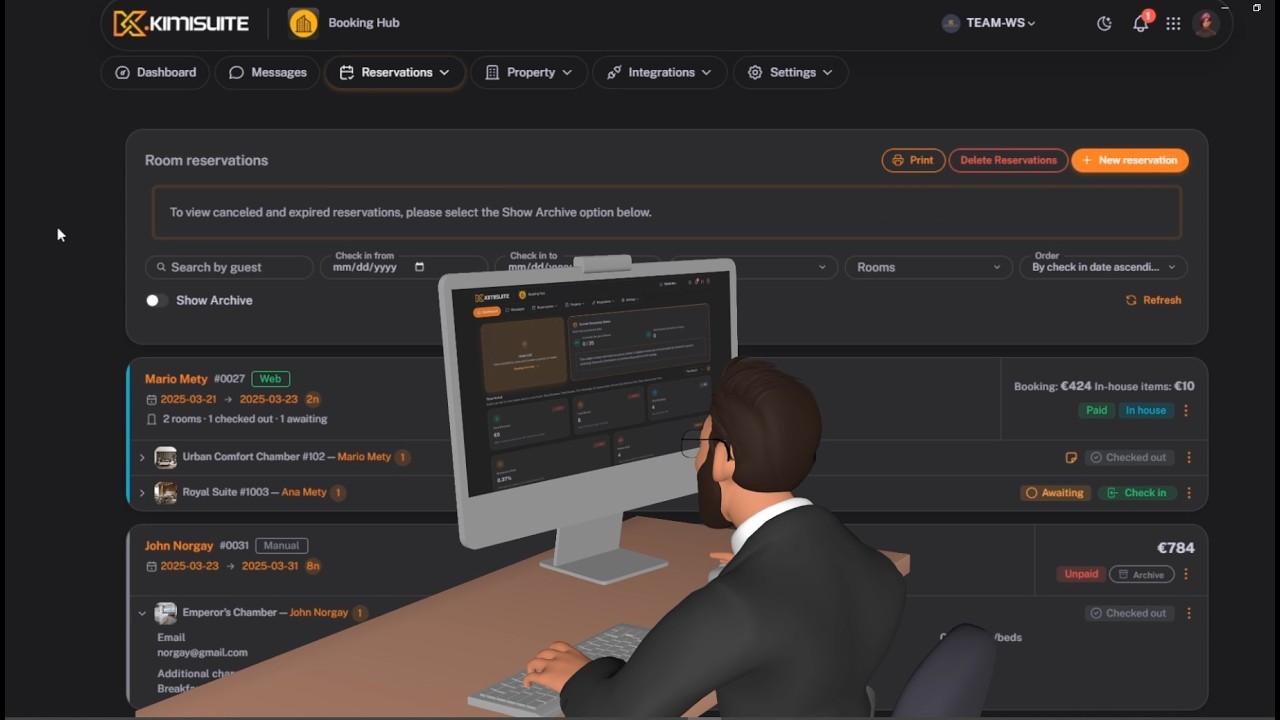
To book multiple hotel rooms properly, put them in one reservation with one reference and one bill, and give each room its own line with its own guests, room number and check-in. That way a family, a group of friends or a team of colleagues is one party for payment, changes and communication, while the front desk still handles every room on its own. The usual alternative, several separate bookings that happen to share a surname, is where most group mistakes begin.

When several rooms belong in one booking
A multi-room reservation fits whenever one person organizes the stay for others:
- a family taking two connecting rooms, or one room for the parents and one for the children;
- friends traveling together who want rooms close to each other;
- colleagues on a business trip, with the company paying for all of them;
- a wedding party or a club trip that books a handful of rooms for the same nights.
Larger groups, such as tour operators with a full rooming list, often start with a written quote rather than an instant booking. That case is covered further down.
What goes wrong with separate bookings
When each room is its own booking, the link between them exists only in someone's head. Typical results:
- One booking is cancelled and nobody notices that it belonged to the group.
- The payments arrive as three amounts and nobody knows whether the group has paid in full.
- The arrival time is noted on one booking and missing on the others.
- One room is moved to another date, and the group no longer stays together.
- The company wants one invoice for all rooms and receives three.
One reservation with several rooms removes these problems, because the system knows the rooms belong together.

Booking Hub
Hotel Booking System Built for Direct Growth
What a multi-room reservation should hold
Some information belongs to the booking as a whole, some to each room.
| Booking level | Room level |
|---|---|
| Lead booker and contact details | Room type and, later, room number |
| Booking reference | Adults, children and children's ages |
| Total price and payment status | Name of the main guest in that room |
| Cancellation terms | Check-in and check-out status |
| Arrival time of the party | Special requests, such as a cot |
The lead booker is the person you talk to about money and changes. The guest name per room matters on the day of arrival, for registration and for anyone who arrives separately.
Taking the booking at the desk or by phone
- Ask how the party splits. "Six people" can mean three doubles or two triples. Ask for the adults and children per room, and the children's ages if your prices depend on them.
- Check every room for every night before you promise. A group that gets two rooms on Friday and only one on Saturday is not booked.
- Note one guest name per room. At least the main guest; the rest can come later.
- Price it per room and in total. Read out both, so the lead booker can split costs with the others if they want.
- Agree who pays. One payer, or each room separately? Agree it now, not at checkout.
- Confirm in writing. The confirmation should list every room with its guests, so the lead booker can check it at a glance.
Letting guests book several rooms online
Guests expect to add a second room on your website the same way they would on a large booking portal. A good booking flow lets them choose rooms one after another for the same dates, set the guests per room, enter children's ages per room and pay once. If your website cannot do this, families either call you, book only part of what they need, or book elsewhere.
Changes and partial cancellations
Decide in advance what happens when one room of a group cancels. Common choices are that single rooms can be cancelled under the same terms as the whole booking, or that a group booking has its own deadline for reducing the number of rooms. Whatever you choose, write it into your terms before you take group bookings. A hotel cancellation policy template gives you wording to start from.
Arrival day and payment
On arrival, check in each room on its own. One family may arrive at noon and the other at ten in the evening, and both need the right status in your system. Assign room numbers close together when the party asked for it, and do it in the morning, before housekeeping releases the last rooms on that floor.
For payment, keep one account per booking. The group may still pay in parts: one person pays for two rooms, another for the third. Record each payment against the rooms it covers, so you always see what the party still owes in total.
Larger groups: quote first, book later
For a tour group or a corporate group, send a written quote with the rooms, dates and prices, and an expiry date. While the quote is open, the rooms should be held, otherwise you may sell them twice. When the organizer accepts, the quote becomes the booking.
Where Booking Hub fits
With the multi-room reservation extension in Booking Hub, your staff book several rooms in one manual reservation, and guests do the same on your booking widget or landing page. The booking has one reference and one total; each room has its own guest name, room number, status and check-in button, so one room can be checked in while another is still awaiting. In the payment dialog you tick the rooms a payment covers, against the one shared balance. A coupon applies only when every room in the booking qualifies. For groups, the Room Offers extension sends a quote that takes the rooms off sale on your website and connected booking portals until the offer is accepted, declined or expires. It works together with CRM Business Hub. More on multi-room booking.
The video shows reservations, check-in, payments and check-out in Booking Hub step by step.