
Gastro POS Hub
Take orders at the till or on the waiter's phone. Every dish goes straight to the right kitchen, and every shift closes with its own X and Z report. Your restaurant runs inside your KIMISUITE workspace, on its own address.
One system from the table to the till
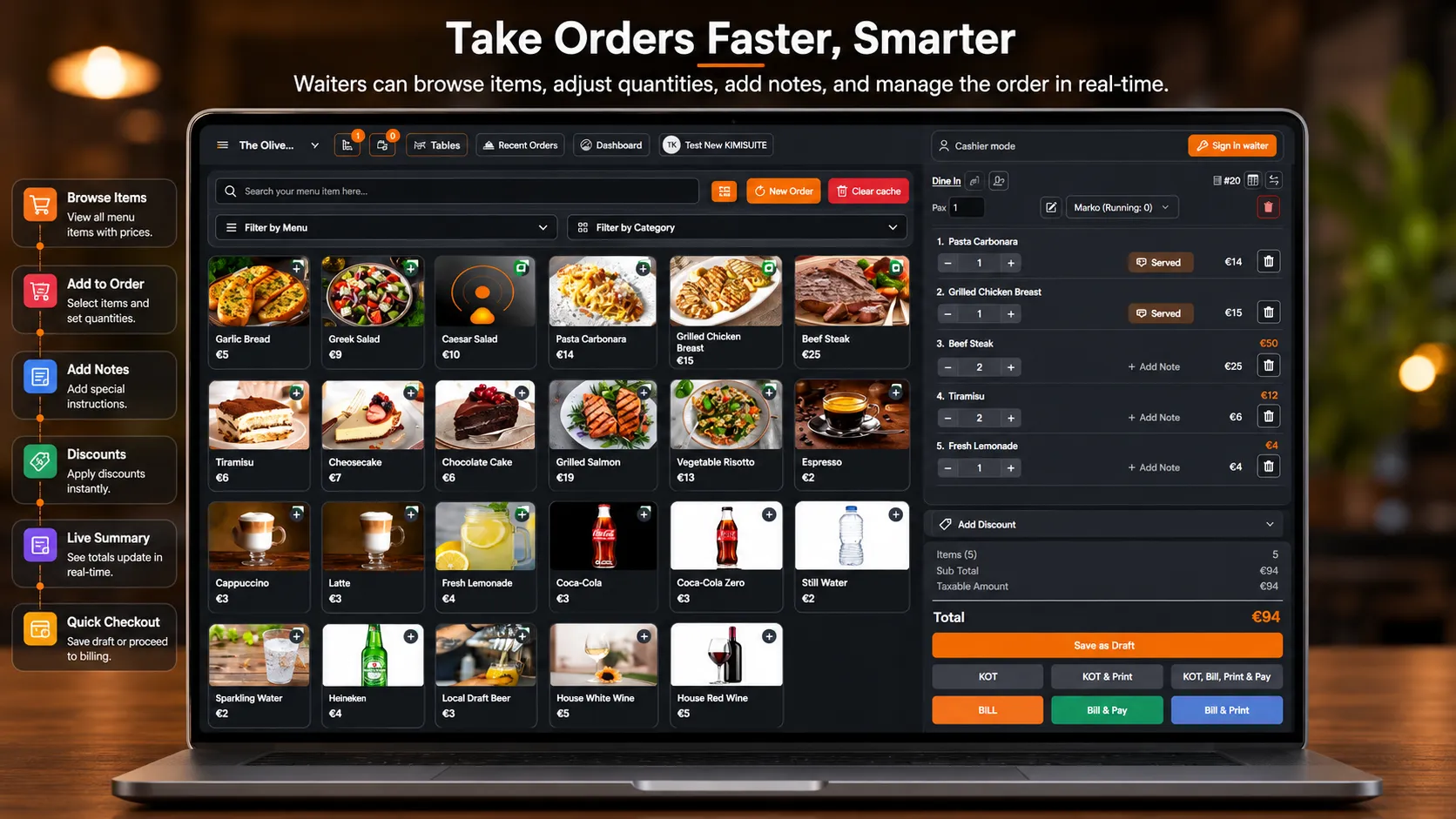
From the order to the kitchen in one tap
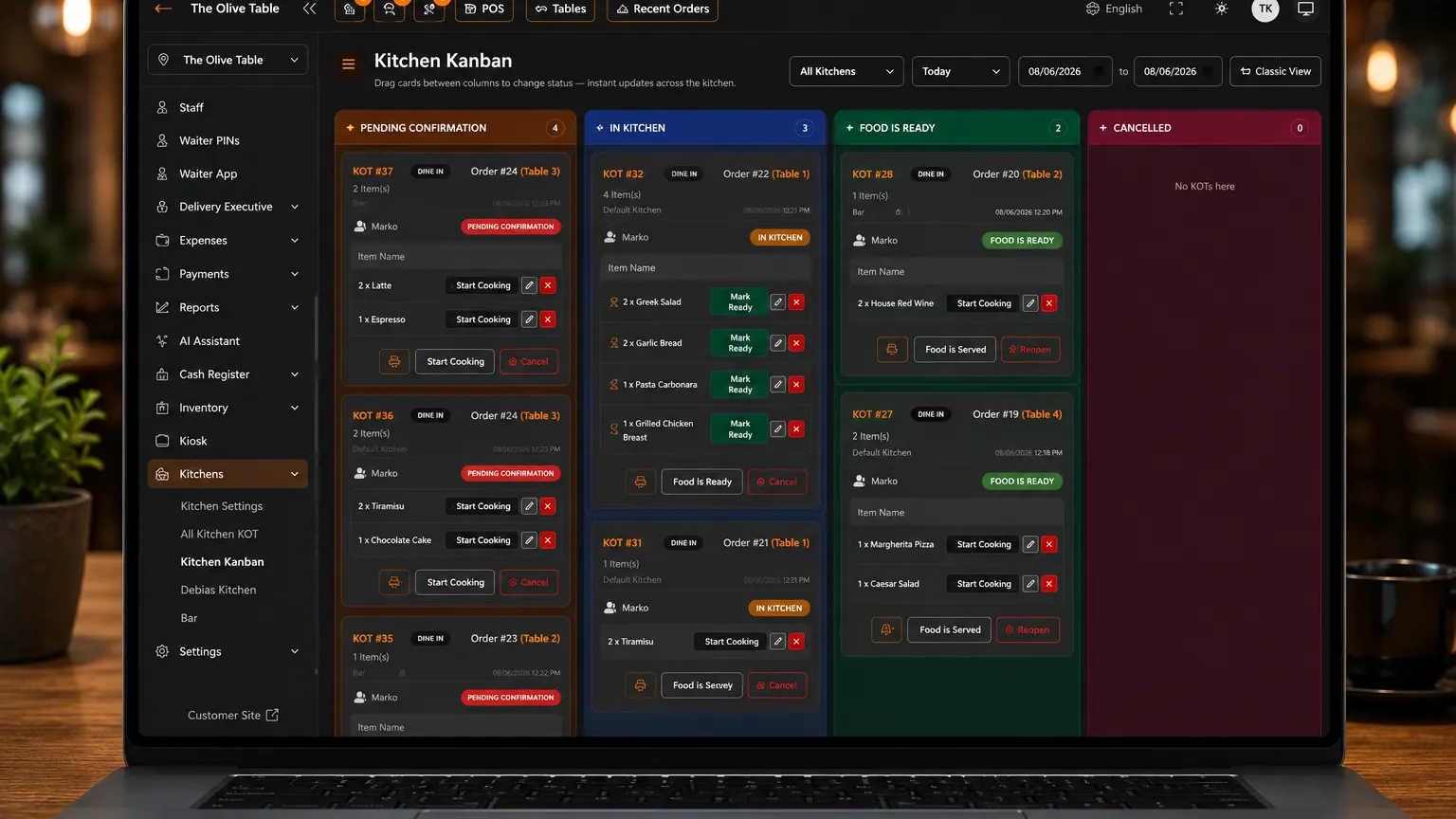
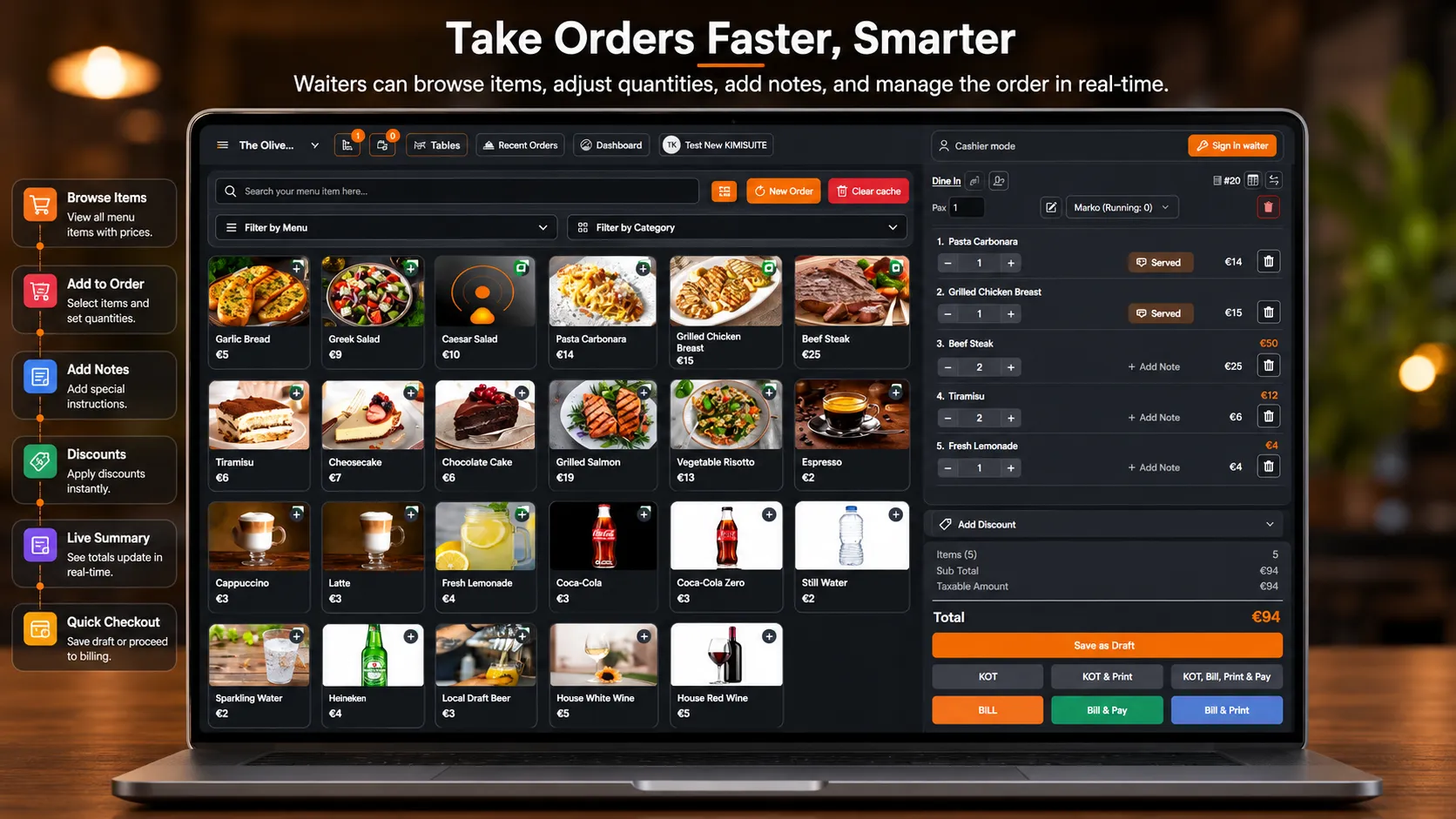
A waiter picks the table, adds the dishes and sends them. Each dish lands on the board of the kitchen or station it belongs to: the grill gets the steak, the bar gets the drinks. When the chef presses Start Cooking, the waiter sees it on the phone without asking at the pass. A second round joins the running order, so the table still ends up on one bill.
Your restaurant, ready in seconds
Pick a plan in KIMISUITE, give your restaurant a name and an address, and it is live. You sign in once at KIMISUITE and open Gastro POS Hub from there. Your staff sign in on the restaurant's own address with a personal PIN and need no KIMISUITE account. Plan and extensions are on your one KIMISUITE bill, paid per workspace, not per user.
Tables the way your room looks
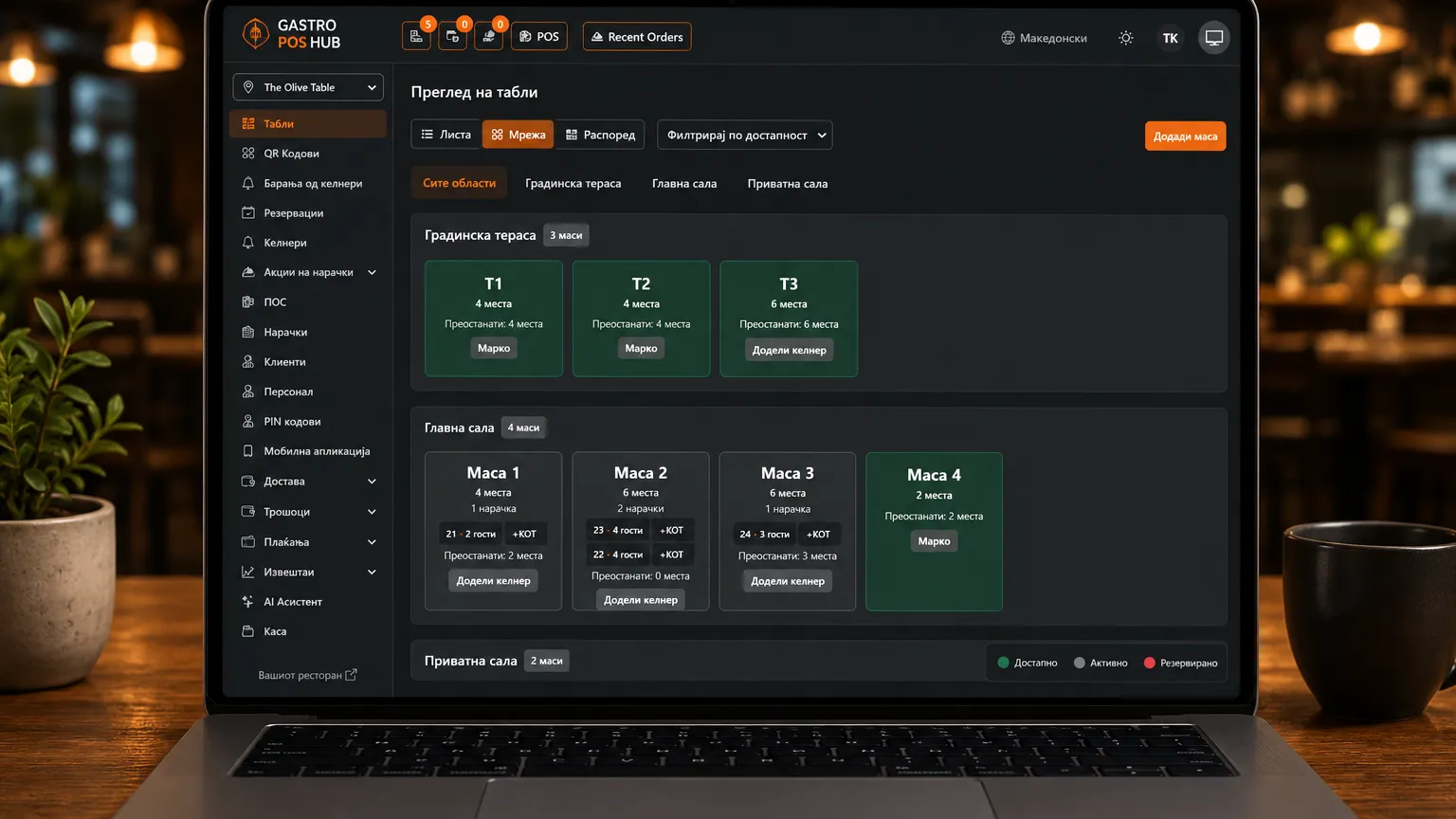
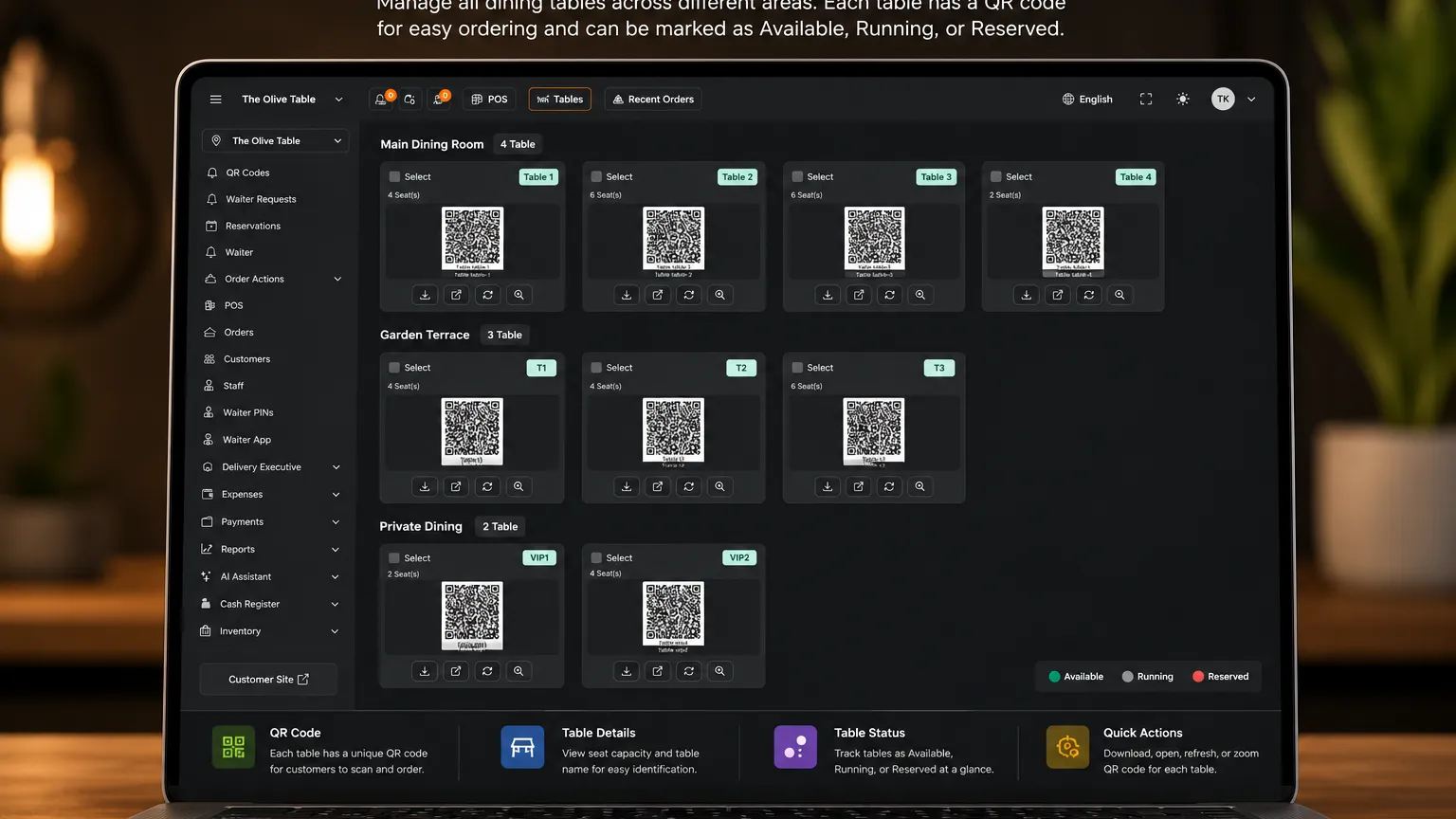
Show your tables as a list, a grid or your own floor layout, with live status for free, running and reserved. Give every table a waiter and a backup waiter, from a start date to an end date, so sections follow your rota.
Built for the rhythm of a real shift
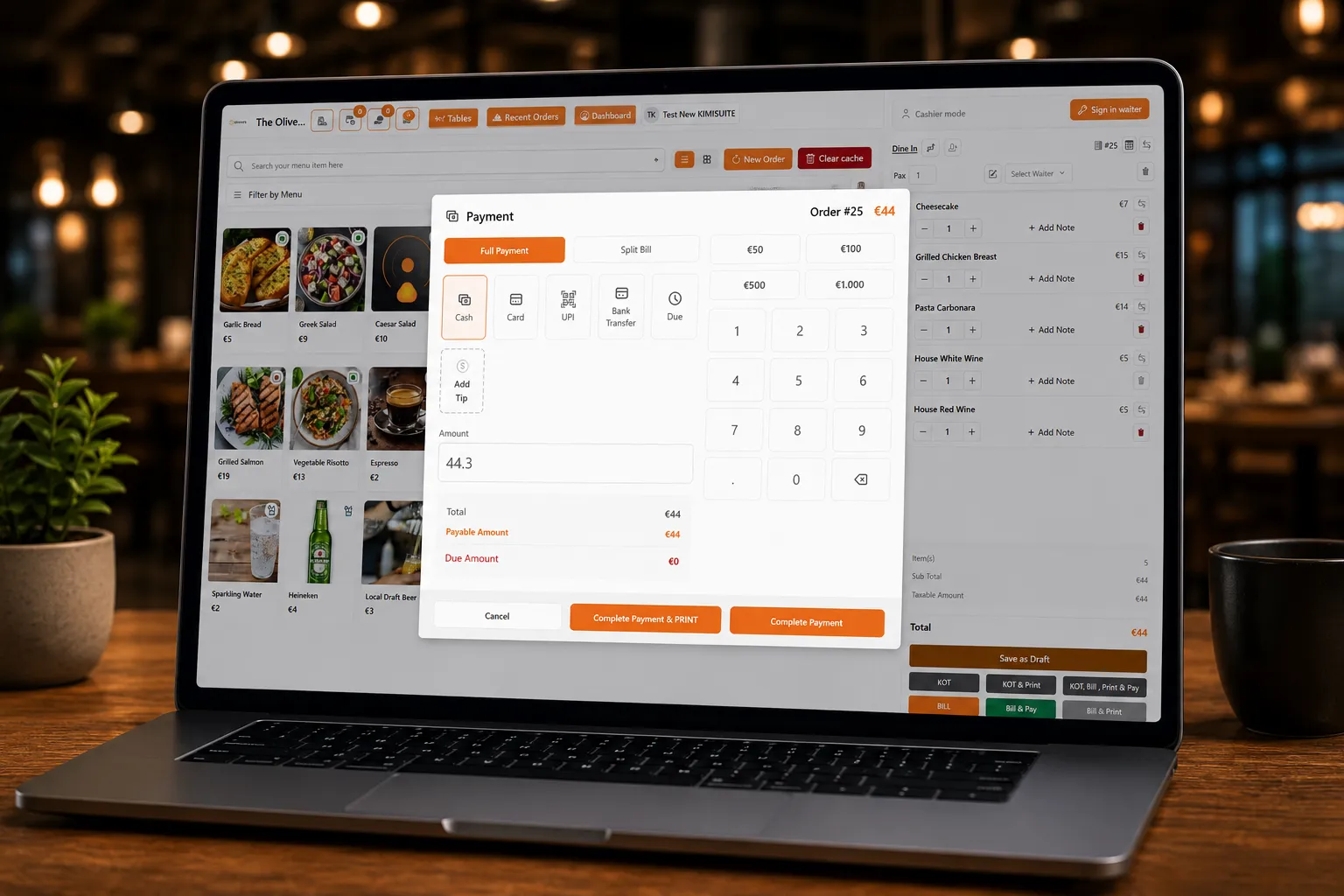
Run the till in the browser on a tablet, PC or phone. An enrolled device opens to a PIN keypad, so every action belongs to a person.
Each dish routes to its kitchen or station with a token number. The chef starts and finishes dishes on the kitchen board.
Waiters take the whole order at the table and see the kitchen status live. Each waiter sees only the tables of their own section.
Every waiter counts their own till against their own takings. X and Z reports, cash in and out and a count by note and coin show where the money is.
A weekly shift per person decides when they can sign in, with a few minutes of tolerance. Outside the shift, nobody touches orders or bills.
With Business, recipes deduct the ingredients the moment a dish is paid. Cost of goods and profit and loss reports show what each plate earns.
The waiter app takes the whole order
Your waiters install the Gastro Hub Waiter app on Android and scan one QR code from the back office. Each of them signs in with their own PIN. From then on the phone takes the complete order at the table: pick the table, choose the dishes, send the ticket to the kitchen. Nobody walks back to the counter to type it in.
The app shows only the tables of the waiter's own section, and it lets them sign in only during their shift. One phone can be handed over at the shift change: whoever signs in gets their own tables, their own shift and their own cash register.
The bill is settled at the till. The waiter signs in there with the same PIN, and the fiscal receipt comes from the till or the fiscal printer, never from the phone.
Plans, branches and the kiosk
Pick the plan that fits your room
- Starter covers the POS, menu, QR menu, tables, kitchen tickets, customers, staff, cash registers and reports for one branch.
- Business adds reservations with table assignment, several tills and kitchens, inventory with recipes and cost and profit reports, expenses, loyalty, the customer display and report exports, for up to three branches.
- Enterprise has no branch limit and adds the self-service kiosk, where guests browse the menu and order on their own screen; the order goes straight to the kitchen and is paid at the till. AI Tools are included too.
The Additional Branch extension adds more branches on any plan. Every branch has its own staff, tables, stock and reports.
Extensions when you need them
WhatsApp Automation, AI Tools, Delivery Platforms for Wolt, Glovo and Bolt Food (with online payment) and Additional Branch. You add them in KIMISUITE and they switch on in your restaurant.
Fiscal receipts in North Macedonia
In North Macedonia, Gastro POS Hub works with the Accent PF-550 and PF-700 fiscal printers, including X and Z reports on the device. Fiscal receipts for other countries are not supported, so outside North Macedonia you use it with the receipt printing your country allows.
Ready to see Gastro POS Hub in action?
Control that pays for itself
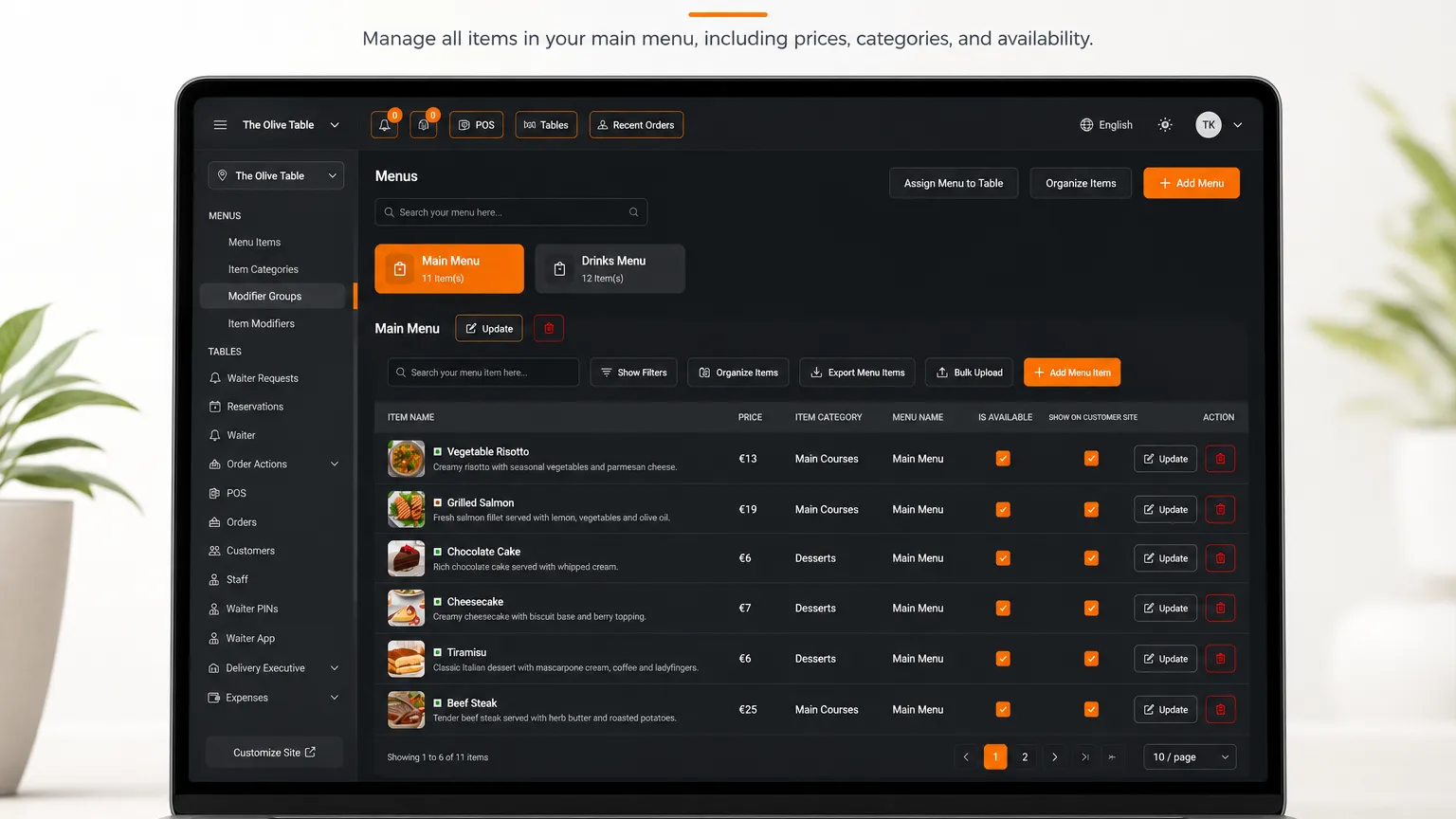
Sales, items, staff and tax reports sit next to removed kitchen items and deleted orders. You see what went to the kitchen and never reached a bill.
Set one price for the dining room, another for pickup and another for delivery. Your margins hold when a delivery platform takes its commission.
All 14 EU allergen groups are ready to tick on every dish, next to dietary marks like vegan and gluten-free.
A register closes with a count by note and coin against the expected cash, then goes to a manager for approval. A shortfall belongs to a person, not to the restaurant.
Guests open the menu on your restaurant's own address or from the QR code on the table, with photos, prices and a language switch.
Connect Restaurant Hub and the menu of the branch you choose stays in sync in both directions.
Pricing Plans
Choose the right plan for your needs. All plans include free updates.
| Gastro POS Hub | Starter €19.90 /mo · per workspace Start Free Trial | Business €49.90 /mo · per workspace Start Free Trial | Recommended Enterprise €99.90 /mo · per workspace Start Free Trial |
|---|---|---|---|
| Menu Management Add, edit, organise menu items and pricing. | |||
| Menu Categories Group menu items into categories (Drinks / Mains / Desserts). | |||
| QR Menu Per-table QR code linking customers to your digital menu. | |||
| Table Management Areas, table states, table-bound orders. | |||
| Order Management Take, route, track and close orders from POS. | |||
| Payment Management Accept cash, card, online and split payments. | |||
| Kitchen Order Tickets (KOT) Auto-fire tickets to kitchen stations; mark items prepared. | |||
| Customer Management Track repeat customers, order history, contact info. | |||
| Staff Management Admin / Branch Head / Waiter / Chef / Cashier with per-role permissions. | |||
| Basic Reports Sales, top items, staff performance, daily summaries. | |||
| Cash Register Open / close shifts with cash counts and variance reporting. | |||
| Table Reservations Booking workflow with auto-assign + customer confirmations. | – | ||
| Waiter Request Customers can call a waiter from the QR menu or kiosk. | – | ||
| MultiPOS Support Multiple POS terminals running concurrently inside one branch. | – | ||
| Multiple Kitchens Route KOTs to multiple kitchen stations (Grill / Bar / Cold Bar). | – | ||
| Inventory Management Stock tracking, low-stock alerts, recipe-implied consumption. | – | ||
| Expense Tracking Log purchases, utilities, payroll for end-of-month P&L. | – | ||
| Loyalty System Points, tiers, customer rewards baked into POS + kiosk. | – | ||
| Delivery Executive Module Driver assignment, dispatch, status updates. | – | ||
| Export Reports CSV / Excel export of every report screen. | – | ||
| Customer Display Second screen at the till showing the order to the customer. | – | ||
| Self-Service Kiosk Guests order on a self-service screen; the order goes straight to the kitchen and is paid at the till. | – | – | |
| AI Tools AI assistants for menu descriptions, sales forecasting, recipe cost. | – | – | |
| Payment Gateway Integration Included with the Delivery Platforms extension. Accept online card payments at QR menu + kiosk. | Add-on | Add-on | Add-on |
| Branches Each branch has its own staff, tables, stock and reports. The Additional Branch extension adds more. | 1 branch | 3 | Unlimited |
| Cost and Profit Reports Cost of goods, profit and loss, stock usage and forecast reports from your inventory and recipes. | – |
- Menu Management Add, edit, organise menu items and pricing.
- Menu Categories Group menu items into categories (Drinks / Mains / Desserts).
- QR Menu Per-table QR code linking customers to your digital menu.
- Table Management Areas, table states, table-bound orders.
- Order Management Take, route, track and close orders from POS.
- Payment Management Accept cash, card, online and split payments.
- Kitchen Order Tickets (KOT) Auto-fire tickets to kitchen stations; mark items prepared.
- Customer Management Track repeat customers, order history, contact info.
- Staff Management Admin / Branch Head / Waiter / Chef / Cashier with per-role permissions.
- Basic Reports Sales, top items, staff performance, daily summaries.
- Cash Register Open / close shifts with cash counts and variance reporting.
- Table Reservations Booking workflow with auto-assign + customer confirmations.–
- Waiter Request Customers can call a waiter from the QR menu or kiosk.–
- MultiPOS Support Multiple POS terminals running concurrently inside one branch.–
- Multiple Kitchens Route KOTs to multiple kitchen stations (Grill / Bar / Cold Bar).–
- Inventory Management Stock tracking, low-stock alerts, recipe-implied consumption.–
- Expense Tracking Log purchases, utilities, payroll for end-of-month P&L.–
- Loyalty System Points, tiers, customer rewards baked into POS + kiosk.–
- Delivery Executive Module Driver assignment, dispatch, status updates.–
- Export Reports CSV / Excel export of every report screen.–
- Customer Display Second screen at the till showing the order to the customer.–
- Self-Service Kiosk Guests order on a self-service screen; the order goes straight to the kitchen and is paid at the till.–
- AI Tools AI assistants for menu descriptions, sales forecasting, recipe cost.–
- Payment Gateway Integration Included with the Delivery Platforms extension. Accept online card payments at QR menu + kiosk.Add-on
- Branches Each branch has its own staff, tables, stock and reports. The Additional Branch extension adds more.1 branch
- Cost and Profit Reports Cost of goods, profit and loss, stock usage and forecast reports from your inventory and recipes.–
Available extensions
Book them with a click, drop them the same way.
 WhatsApp Automation
Send order confirmations, ready-for-pickup pings, reservation reminders, and loyalty-point notifications over WhatsApp Business API. Customers reply to the same thread; staff see it in the unified inbox.
€9.90 /mo Additional Branch
Add another physical location beyond your plan's included branches. Each branch gets its own staff, tables, stock, and reports — all rolling up to the same restaurant. Buy as many as you need; cancel any time.
€19.90 /mo AI Tools
AI menu description writer, sales forecasting for staffing + prep, recipe-cost optimisation suggestions, customer review summariser, and smart upsell hints at the POS. Already included with the Enterprise plan; buy this as a standalone add-on on Starter / Business if you want the AI features without upgrading the whole tier. Powered by your Kimisuite AI credit pool — no extra API keys required.
€14.90 /mo Delivery Platforms
Adds third-party delivery platform integrations (Wolt, Glovo, Bolt Food, Foodpanda) on top of the in-house Delivery Executive Module bundled with Business+, AND includes the full Payment Gateway Integration — online card payments at QR menu and kiosk via Stripe, PayPal, Razorpay, Flutterwave, Paystack, PayFast, Tap, Xendit, Mollie or Epay. Inbound aggregator orders land straight in your POS, customer-facing tracking link, delivery-fee calculation by zone or distance, and reconciliation in the same Sales + Tax reports as your offline payments.
€24.90 /mo
Features Built for Growth
Everything you need to scale your business
Multi-Device POS
One till on every screen, one PIN per person.
Tables & Floor Plan
Drag-to-design your floor with named areas and live table status.
Kitchen Tickets (KOT)
Orders route to the right station the moment the waiter sends them — with colour-coded ageing.
Cash Register & Shifts
Open and close shift with a cash count. Z-reports, X-reports, per-cashier accountability.
Reservations & Waiter Requests
Customers book ahead. Waiters call colleagues with a button instead of shouting.
Inventory & Recipes
Stock that follows every plate you sell.
Delivery Executive Board
Dispatch riders, assign orders, follow status from pickup to drop-off.
Loyalty Programme
Points or stamps that bring regulars back.
AI Menu Writer & Sales Forecasting
Menu descriptions in any language; next week's covers projected next to today's stock.
Gastro POS Hub
FAQ
Common questions about Gastro POS Hub answered clearly.
Ready to See It in Action?
Discover how KIMISUITE connects growth, automation and AI into one unified system.
Take Your Business to The Next Level!
Stop paying for tools you barely use. Start running your business on KIMISUITE.
No long-term contract · Cancel anytime · 14 days free
