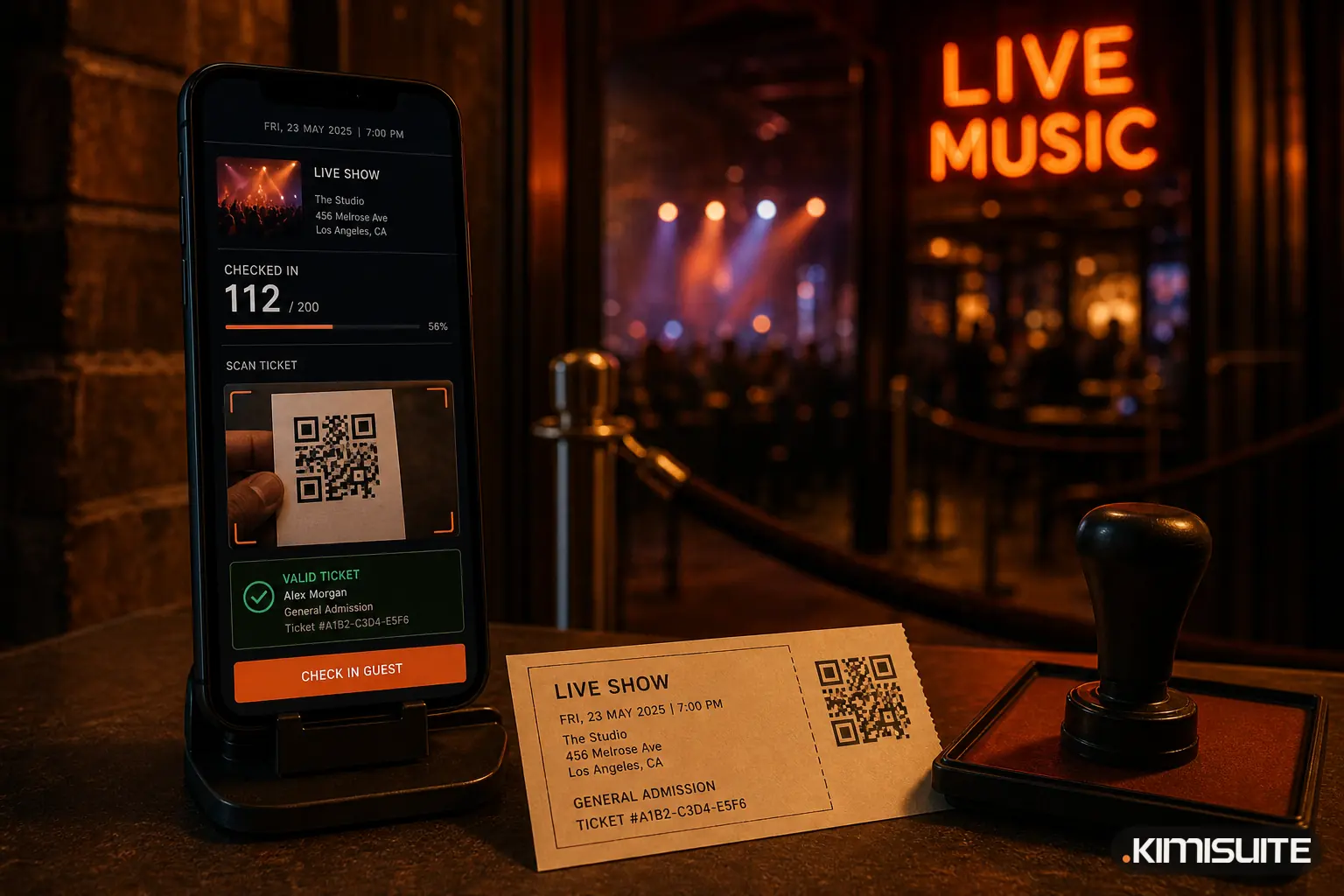
An event check-in app scans the QR code on each ticket at the entrance, confirms that it is valid for this event and date, and marks it as used so it cannot get in twice. Done well, it turns a queue of 400 people into a steady flow of a few seconds per guest. Done badly, it is a frozen phone, a dead Wi-Fi network and a line out into the street.
Event Ticket Hub, the ticketing app in KIMISUITE, includes a scanner that runs on any smartphone, keeps working without a connection and needs no app store download. This article explains how check-in works and how to set up your door for a smooth evening.
What a door team really needs
Ask anyone who has worked an entrance, and the list is short:
- Fast scans, one guest every few seconds
- Clear answers: green means in, anything else says why not
- No dependency on the venue Wi-Fi, which always fails when the hall is full
- A way to help guests without a ticket on their phone
- Live numbers, so the organiser knows how many people are inside
The ticket scanner in Event Ticket Hub is built around exactly these points.
Set up a scanner in one minute
The scanner runs in the phone's browser, so your volunteers can use their own phones. There is nothing to install.
- In Event Ticket Hub, you create a device and get an 8-character pairing code or a QR code. The code is valid for one hour.
- On the phone, your door staff open the scanner page and enter or scan the code.
- The phone is now paired as a door scanner for your events.
You can pair as many phones as you need, in every plan. If a phone gets lost or a volunteer leaves, you revoke that one device with a click. You can also pair a device again later, for example for the next festival weekend.
Scanning at the door
Each scan shows a clear result in large letters, with a sound and vibration so staff do not need to stare at the screen:
| Result | What it means |
|---|---|
| Valid | Let the guest in |
| Already checked in | This ticket was used before |
| Wrong date | The ticket is for another date of the same event |
| Wrong entrance | The ticket belongs to a different entrance |
| Not valid | The code was changed or is not one of your tickets |
| Too early | Doors are not open yet |
A torch button helps in dark foyers, and staff can type a ticket code by hand if a phone screen is cracked.
Works without a connection
Every ticket QR code is signed, so the scanner can tell a genuine ticket from a copy without asking the server. If the connection drops, scanning simply continues. The scans are stored on the phone and sent as soon as the connection is back.
For you, that means you can check guests in at an open-air stage, a basement club or a sports ground with patchy mobile reception, without hoping the network holds.
When the ticket is not on the phone
Not every guest arrives with a QR code ready. Some forgot to download the PDF, some have a flat battery, some bought for the whole family on one phone. For these cases, the door team can search the guest list by name or order and check in a single ticket or the whole order at once.
Buyers can always get back to their tickets on the "Check your booking" page with their order number and e-mail address. That is worth printing on a small sign at the entrance.
Several entrances, the right people at each
Larger venues rarely have just one door. In Event Ticket Hub, you can define entrances, for example "Main entrance", "VIP" and "Backstage", and decide:
- which ticket types may use each entrance
- when each entrance opens
- whether guests may leave and come back in, with in and out scans
In the larger plans, you can also assign door staff per event, per date or per entrance. Your volunteer for Saturday's main entrance sees exactly that, and nothing else.
During the event, the organiser sees live check-in numbers per entrance. After the event, the check-in report shows who came, and the attendee list can be exported to Excel. More on event reports.
Extra protection for high-demand events
For events where tickets are in demand and screenshots get shared, Event Ticket Hub offers two additional tools:
- A rotating QR code. The code on the buyer's order page changes every 15 seconds, so a screenshot sent to a friend no longer works at the door.
- A waiting room. When a big sale opens, buyers are let into the shop in waves and see their position and waiting time, instead of everyone hitting the checkout at once.
Both are available in the largest plan or as an extension for the others.
Season passes at the door
Season pass holders get a ticket for every date by e-mail, for the seat they hold all season. At the door, that ticket scans like any other, and "Wrong date" catches the holder who brings last week's ticket by mistake. More on season tickets.
A checklist for your next event
- Pair all door phones the day before, not at the door
- Test one scan per entrance with a staff ticket
- Charge the phones and bring a power bank
- Put up a small sign: "Find your tickets: Check your booking"
- Have one person at the door who can search the guest list
- Watch the live numbers and send help to the busiest entrance
If you are just getting started with ticketing, read our guide to selling tickets online without per-ticket fees.
Event Ticket Hub is part of your KIMISUITE workspace. Scanner devices are unlimited in every plan, and KIMISUITE is billed per workspace, not per user. Create your free workspace and try it with a free trial.
Check in your guests with Event Ticket Hub
Cancel anytime · No minimum term · 14 days free