A website redesign with AI starts from the site you already have. Instead of briefing an agency or copying texts page by page into a new tool, you give the AI your current web address. It reads your pages, keeps what is worth keeping, and builds a fresh, modern version you can edit and publish.
That is exactly what the website import in the KIMISUITE AI Website Builder does. And since 17 October 2026, the new site can be in almost any language your visitors speak, not only the 16 languages KIMISUITE itself runs in.
Why redesigns stall
Most small businesses know their website is outdated long before they do anything about it. The reasons are always the same:
- The content is scattered. Texts, photos and opening hours live on a site nobody has logged into for years.
- Starting over feels like a project. A new site means new texts, new photos and new structure, all at once.
- The old system is a dead end. The plugin no longer updates, the theme breaks on phones, the developer has moved on.
An import turns "start over" into "start from what you have". You keep your content and your look where it still works, and you get a site that is fast, secure and easy to change.
How the import works
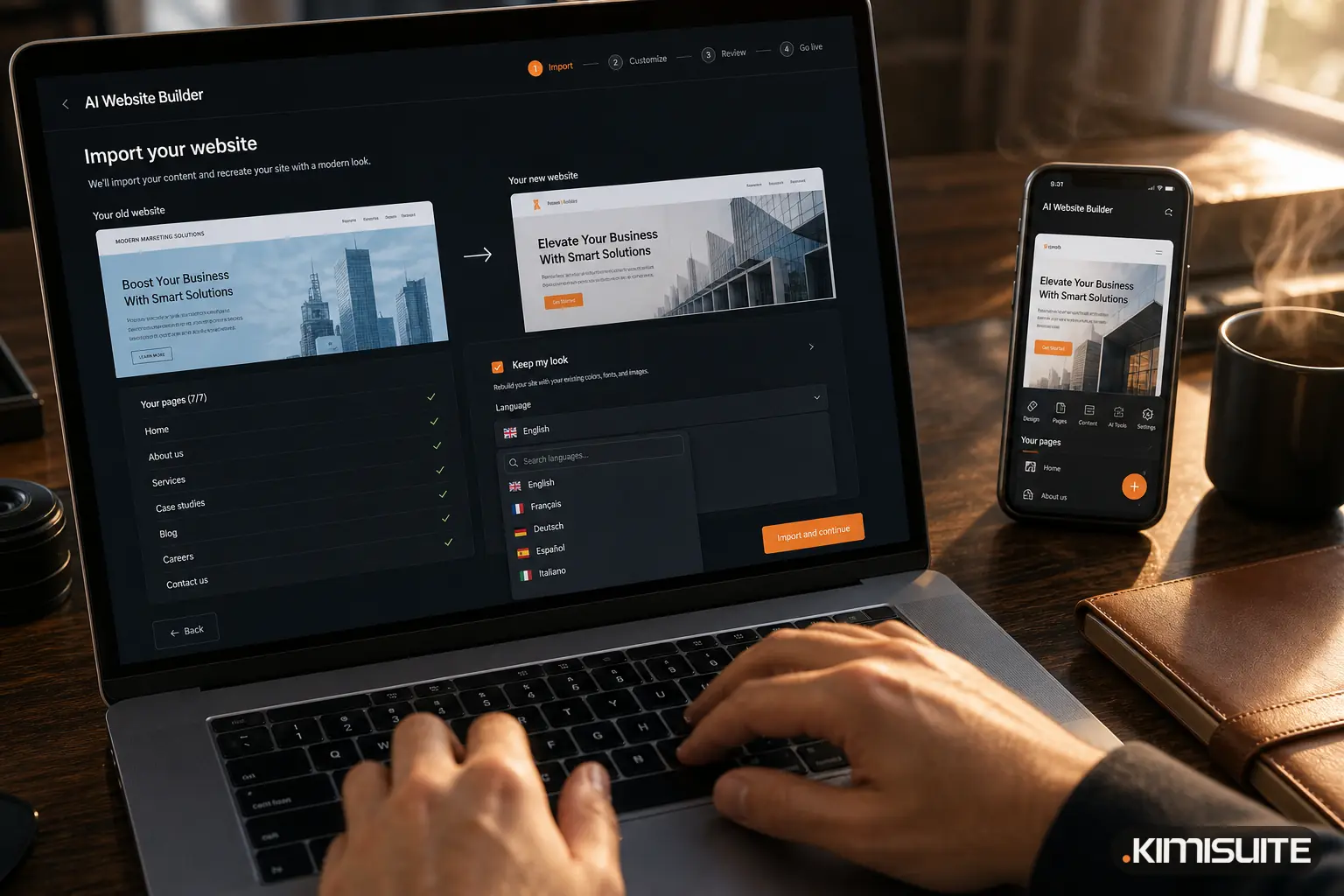
You start a new website in the AI Website Builder and choose "I already have a website". Then:
- Enter your web address. The builder reads your menu and sitemap.
- Show my pages. You see a list of the pages it found, usually within seconds. This step is free.
- Tick the pages you want, up to 25. Most small business sites need fewer than ten.
- Keep my look, if you like your colours. The builder takes over your colours, fonts, button style, logo, pictures and existing language versions.
- Build. About a minute later, your new site is in the editor.
On a real three-page website, the list of pages was ready after 8 seconds and the rebuilt site after about a minute.
What comes over, and what you set up fresh
The import brings your texts, pictures, structure and design into the new site. A few things are better set up new rather than copied:
| Part of your old site | In the new site |
|---|---|
| Page texts and headlines | Imported, ready to edit |
| Photos and logo | Imported |
| Colours, fonts, buttons | Kept with "Keep my look" |
| Language versions | Imported |
| Imprint and privacy policy | Written fresh with the legal wizard for your country |
| Contact form | New form with spam protection and inbox |
| Blog articles | Not imported |
| Live counters or feeds | Become static text you can update |
The legal texts are a good example. An imprint from 2019 may no longer match your company details or the current rules. The builder's wizard writes a new imprint, privacy policy and accessibility statement for Austria, Germany, Switzerland, the EU or international businesses, and you check and confirm them before publishing.
Then make it better than before
An import is a starting point, not a photocopy. Once the pages are in the editor, trettly, the KIMISUITE AI, helps you improve them:
- "Shorten the home page and put our opening hours at the top."
- "Rewrite the About page so it sounds less formal."
- "Add a section with our three most popular services."
You can also click on any text in the preview and change it directly, swap pictures, or try another design while keeping your texts. Every change can be undone.
Many older sites also miss the technical basics that search engines and AI assistants expect today. The rebuilt site comes with page titles and descriptions, a sitemap, structured data for your business and opening hours, language tags and fast loading out of the box. Check how your pages will look when someone shares them with our free Open Graph preview generator.
Any language, not just the big ones
Since 17 October 2026, the AI Website Builder no longer limits your site to a fixed list of languages. You choose the languages your customers actually speak.
- The 16 KIMISUITE languages appear first, with flags: English, German, French, Spanish, Italian, Portuguese, Dutch, Swedish, Turkish, Greek, Bulgarian, Croatian, Serbian, Albanian, Macedonian and Arabic.
- Every other language can be found with the search, for example Japanese, Polish or Czech.
- Write your description in the language you think in. trettly reads the main language from your description and builds the site in it. Macedonian is always written in Cyrillic.
Translations are a separate step after the build. For a four-page site, translating into one more language takes under a minute. Visitors switch languages with a flag menu, and each version is tagged correctly for search engines. How many languages you can publish at once depends on your plan.
Three realistic examples:
- A guesthouse on the Croatian coast imports its old Croatian site and adds German, English and Polish for its main guest groups.
- A dental practice in Vienna keeps German as the main language and adds Turkish and Serbian for patients who feel more confident reading in their first language.
- A Japanese restaurant in Amsterdam writes its description in English and publishes in Dutch, English and Japanese.
See more on multilingual websites.
From import to live
When the new site is ready, you publish it under your own domain. The domain assistant shows the DNS records to copy, checks each step and switches the site on with HTTPS included. Your old hosting can be cancelled once the new site is live.
If you are wondering how the builder works when you start without an existing website, read AI Website Builder: From a Few Sentences to a Live, Multilingual Website.
Try it with your own site
The fastest way to judge an import is to run one. Add the AI Website Builder to your workspace, enter your current address and look at the list of pages it finds. If you don't have a workspace yet, create one for free and start the app with a free trial.
Rebuild your website with the AI Website Builder
Cancel anytime · No minimum term · 14 days free