 Part of QR Generator
 One code for the App Store and Google Play
iPhone to the App Store, Android to Google Play
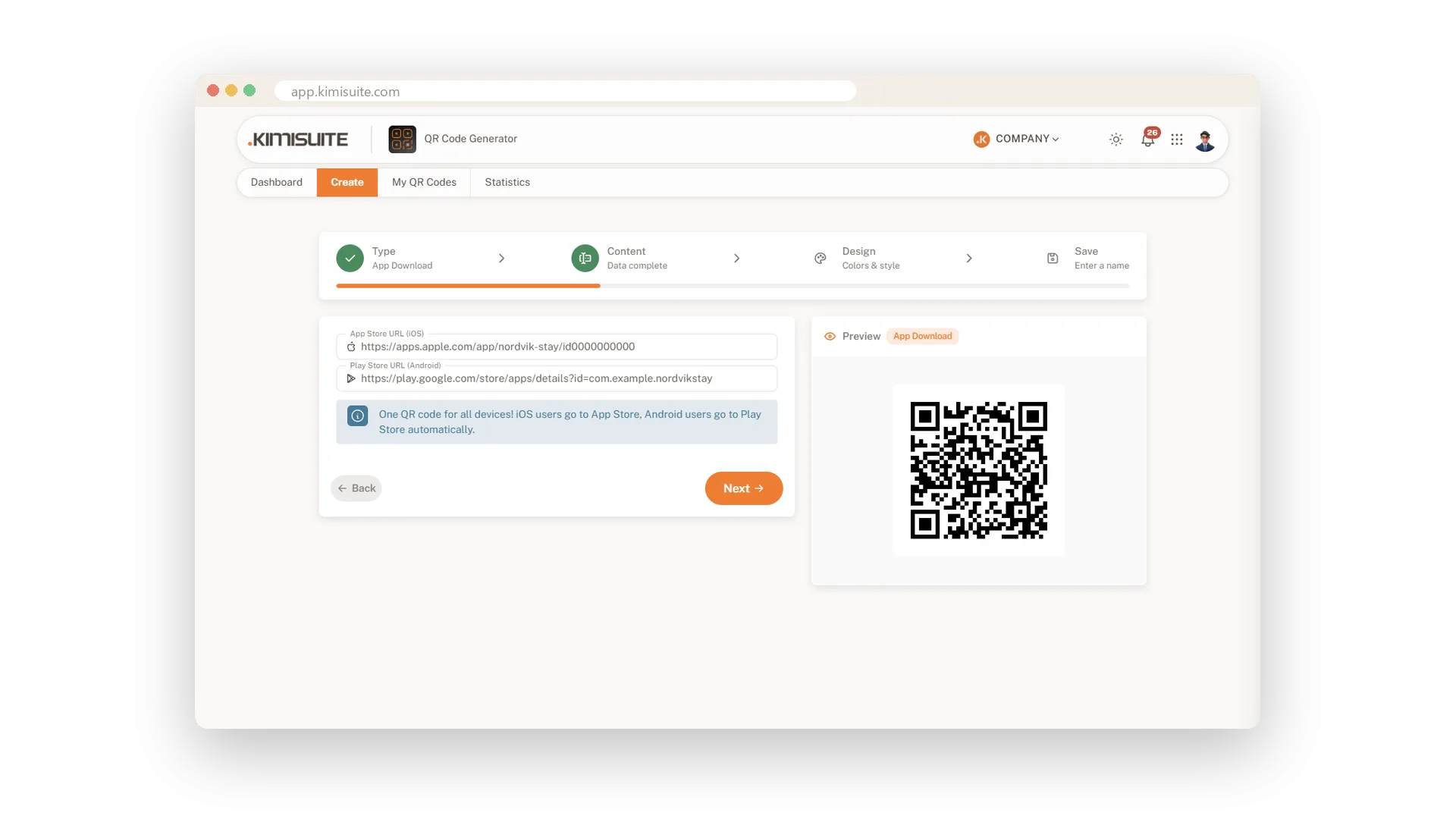
Two store badges and two codes confuse people, and half of them scan the wrong one. With an app download QR code you print a single code. Every scan checks the phone and opens the right store: Android goes to Google Play, iPhone and iPad go to the App Store.
Enter the App Store link and the Google Play link, style the code in your colours and add your logo. Because the code is dynamic, you can update either link later and count every scan. Put it on your packaging, your flyers or your shop window and let each phone find its own way.
Key Benefits
One printed code for both stores instead of two badges
Android opens Google Play, iPhone and iPad open the App Store
Update either store link later, the printed code stays the same
Counts every scan, so you see how many downloads your print starts
Use Cases
Your app on the receipt
A restaurant prints one code on every receipt for its ordering app. Each guest lands in the right store for their phone.
A trade fair stand
One large code on the stand wall, no second badge. Visitors scan with whatever phone they carry and install the app on the spot.
Packaging that lasts
The code on the product box points to both stores. When a store link changes, you update it and the boxes keep working.
FAQ
Try QR Generator today
Dynamic QR codes with your logo, colours and scan statistics
14 days free, cancel anytime, no minimum term.
